ToolFormer - Language Models Can Teach Themselves to Use Tools
1. Introduction
| Key | Value |
|---|---|
| Paper | https://arxiv.org/pdf/2302.04761 |
| Publication Date | 2023 |
1.1 TL;DR
Problem
대형 언어 모델은 언어 생성 능력은 강하지만, 정확한 산술 계산, 최신 사실 조회, 날짜 연산 등에서는 취약합니다.
가장 단순한 해결책은 검색엔진·계산기·캘린더 같은 외부 도구를 쓰게 하는 것이지만, 기존 접근은
- (1) 대량의 사람 주석에 의존
- (2) 특정 과제 전용 설계에 묶여 일반성이 떨어진다는 한계 존재
Brief Solution
ToolFormer는 최소한의 데모만으로 모델이 스스로 도구 사용을 학습하도록 합니다. 핵심 요건은 다음과 같습니다.
- LLM이 스스로 외부 API 를 호출할지, self supervised 학습.
- 데이터 레이블을 스스로 직접 생성하고 자동으로 미세 조정
- 실제 NLL(negative log likelihood)을 낮추는 호출을 남김
- 계산기·검색·번역·캘린더 등 다양한 도구를 하나의 통일된 포맷으로 다룸
1.2 Examples
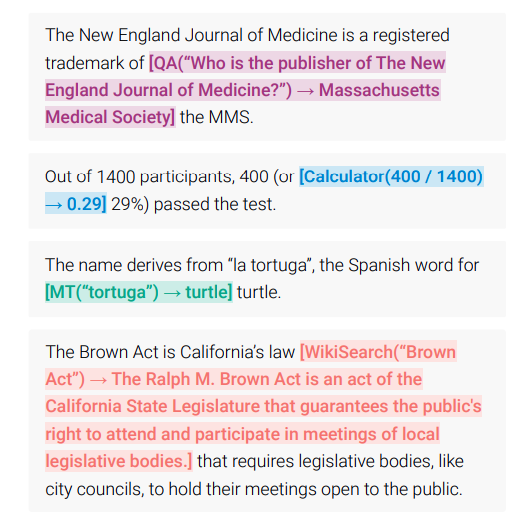
- 계산기: [Calculator(400 / 1400) → 0.29]
- QA: [QA(“Who is the publisher of The New England Journal of Medicine?”) → Massachusetts Medical Society]
- Wiki Search: [WikiSearch(“BrownAct”) → The Ralph M. Brown Act is an act of the California State Legislature that guarantees the public’s right to attend and participate in meetings of local legislative bodies.]
1.3 Pipeline

2. How it works
2.1 Format & Notation
- API 호출 표현: \(c = (a_c, i_c)\)
- a_c: API 이름 (예: Calculator, WikiSearch)
- i_c: API arguments (예: 질의, 수식 등)
위의 수식적 표현은 Tuple 로 이루어져 있습니다. (수학적 관점에서)
하지만 Language Model에서는 문자열 즉 Token Sequence 를 다룰수 있기 때문에 Tuple 같은 구조체를 다룰수 없습니다.
따라서 \((a_c, i_c, r)\) 같은 구조를 -> 일렬의 문자열로 바꿔야 합니다.
이것을 논문에서는 Linearized Sequence 라고 부릅니다.
여기서
2.2 Sampling API Calls
- Prompt 를 만듬 (P(x))
- 각 API 마다 prompt 템플릿을 만듬
- prompt는 모델한테 해당 텍스트 안에 API call을 생성하도록 힌트를 줌
Question Answering API Prompt 예시
Your task is to add calls to a Question Answering API to a piece of text.
The questions should help you get information required to complete the text.
You can call the API by writing "[QA(question)]" where "question" is the
question you want to ask.

Here are some examples of API calls:

Input: Joe Biden was born in Scranton, Pennsylvania.
Output: Joe Biden was born in [QA("Where was Joe Biden born?")] Scranton, [QA("In which state is Scranton?")] Pennsylvania.
Calculator API Prompt 예시
Your task is to add calls to a Calculator API to a piece of text.
The calls should help you get information required to complete the text.
You can call the API by writing "[Calculator(expression)]"
where "expression" is the expression to be computed.

Here are some examples of API calls:

Input: The number in the next term is 18 + 12 x 3 = 54.
Output: The number in the next term is 18 + 12 x 3 = [Calculator(18 + 12 * 3)] 54.
- API Call 위치 후보 찾기
- Input Text의 i위치 마다, <API> 토큰이 나올 확률을 모델한테 계산
- \[p_i = P_M (\langle \text{API} \rangle | P(x), x_{1:i-1})\]
- 여기서 나온 확률이 특정 threshold 보다 크면, 해당 positions 을 들고 있음.
- 관련 positions 이 너무 많으면 상위 K 개만 선택함
다음은 예제 코드. (이렇게 돌리면 안됨. 그냥 예제)
# ------------------------------
# 1. Prompt P(x) 준비
# ------------------------------
text = "Joe Biden was born in Scranton, Pennsylvania."
prompt = "Add helpful API calls to clarify this text:\n"  # P(x)
inputs = tokenizer(prompt + text, return_tensors="pt").to(model.device)

# ------------------------------
# 2. 각 위치별로 <API> 시작 확률 계산
# ------------------------------
input_ids = inputs["input_ids"][0]  # shape: [seq_len]
seq_len = input_ids.size(0)

# special token 정의 (논문에서는 실제론 '[' 사용)
API_START = tokenizer.convert_tokens_to_ids("[")

threshold = 0.01
top_k = 5

api_probs = []
with torch.no_grad():
    for i in range(1, seq_len):
        prefix_ids = input_ids[:i].unsqueeze(0)  # prefix
        outputs = model(prefix_ids)
        logits = outputs.logits[:, -1, :]  # last token logits
        probs = torch.softmax(logits, dim=-1)
        p_api = probs[0, API_START].item()
        api_probs.append((i, p_api))

# threshold filtering + top-k
candidates = [(i, p) for (i, p) in api_probs if p > threshold]
candidates = sorted(candidates, key=lambda x: x[1], reverse=True)[:top_k]
2.3 API 호출
여기서 전체 API 호출을 합니다.
구현에 달려 있는 것이기 때문에, python 함수를 실행할지, API 를 호출할지, 다른 model 을 호출할지 등등 모두 자유
2.4 Filtering API Calls
- \(\mathcal{L}_{\text{plain}}\) : API 호출 없이, plain LM loss
- \(\mathcal{L}_{\text{aug}}\) : API call + 결과를 포함한 LM Loss
- \(\Delta^{(i)}\) : loss 의 개선 정도
- \(\Delta^{(i)} \gt 0\) : API Call 이 실제로 두움이 됨
- \(\Delta^{(i)} \ge \gamma_f\) : API Call 이 충분히 도움이 된다고 판단 -> 해당 API 호출을 유지
이중에서 Delta 값이 특정 threshold 이상인 것만 남김니다.
\[\mathcal{L}_{\text{plain}}^{(i)} - \mathcal{L}_{\text{aug}}^{(i)} \ge \gamma_f\]2.5 Model Finetuning After Sampling & Filtering
이렇게 필터링된 API 호출들을 포함한 결과 (\mathcal{C}^*) 를 가지고, 모델을 파인튜닝합니다.
삽입 과정은 다음과 같이 합니다.
# Input text
User: What’s the weather in Seoul today?

# Internal API call
[API CALL] weather_api("seoul", "today")
[API_RESULT] {"temperature": "25°C", "condition": "Sunny"}

# 다음과 같이 결과가 만들어 집니다.
<API> weather_api("seoul", "today") -> {"temperature": "25°C", "condition": "Sunny"} </API>

# 위의 API 호출 결과를 LLM이 참조후에 최정 답변을 생성
[Target Label] IT's 25°C and Sunny in Seoul today.
3. Implementation
3.1 Open WebUI
예제 구현 코드.
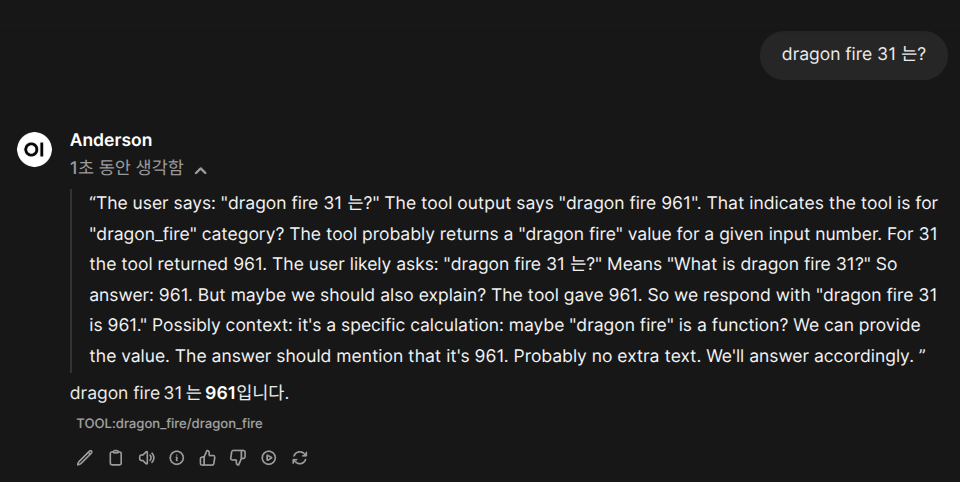
“dragon fire 343 는 몇이야?” 이런식으로 질문하면, 아래의 함수를 실행하고 답변을 줍니다.
답변은 테스트 용이기 때문에, 지정된 답변을 줍니다.
"""
title: Dragon Fire Bitcoin Analyzer
author: Anderson
description: A tool that analyzes Bitcoin's dragon fire intensity level
version: 1.0.0
license: MIT
"""

from typing import Optional

# Optional manifest
manifest = {
    "title": "Dragon Fire Bitcoin Analyzer",
    "author": "Anderson",
    "version": "1.0.0",
    "license": "MIT",
    "description": "A tool that analyzes Bitcoin's dragon fire intensity level"
}


class Tools:
    def __init__(self):
        pass

    def dragon_fire(
        self,
        value: int,
        __event_emitter__: Optional[object] = None
    ) -> str:
        """
        Calculate dragon fire intensity by squaring the input value.

        Args:
            value: Integer value to calculate dragon fire for
            __event_emitter__: Optional event emitter for status updates

        Returns:
            Dragon fire result with squared value
        """

        if __event_emitter__:
            __event_emitter__({
                "type": "status",
                "data": {"description": f"Calculating dragon fire for {value}...", "done": False}
            })

        result = value ** 2

        if __event_emitter__:
            __event_emitter__({
                "type": "status",
                "data": {"description": "Dragon fire calculation completed", "done": True}
            })

        return f"dragon fire {result}"
아래는 실제로 돌려본 예제 입니다.