Antigravity Personal Settings
- 혹시 윈도우면, wsl –install 이걸로 우분투 사용 가능함. 이후 wsl 로 ubuntu 처럼 사용
1. Hot Keys
1.1 Hot Keys
| Category | Title | Hot Key | Description |
|---|---|---|---|
| Antigravity | Open Command | CTRL + SHIFT + P | |
| Terminal | CTRL + ` | Open/focus terminal | |
| Word Wrap | ALT + Z | Toggle Word Wrap |
1.2 Command
| Category | Command | Description |
|---|---|---|
| Python | Python: Select Interpreter | 특정 버젼 Python 선택 |
| Python: Configure Test | Pytest등의 test 툴을 선택 |
2. Extensions
2.1 Python Support in Antigravity
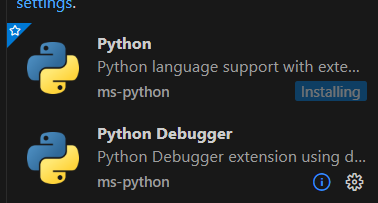
Python 실행하고 하려면 해당 extensions 도 설치해야 함.
실제 Python을 설치하는게 아니라, Python을 실행할수 있도록 도와주는 extension
아래와 같이 검색
@category:debuggers Python
2.2 Remote-SSH: Connect to SSH Host…
먼저 ~/.ssh/config 에 다음을 작성
Host oracle
    HostName 134.185.117.137
    Port 22
    User ubuntu
    IdentityFile C:\Users\anderson\.ssh\id_ed25519
    ControlMaster auto
    ControlPath ~/.ssh/cm-%r@%h:%p
    ControlPersist 10m
윈도우에서는 Multiplexing (한번 만든 SSH연결을 여러 세션이 같이 쓰게 하는 기능) 끄는게 좋아
Host oracle
    HostName 134.185.117.137
    Port 22
    User ubuntu
    IdentityFile C:\Users\anderson\.ssh\id_ed25519
Bastion 에서는 다음과 같이 설정
# Bastion 호스트 서버
Host oracle-bastion
    HostName 1.2.3.4
    Port 22
    User ec2-user
    IdentityFile C:/Users/anderson/.ssh/bastion.pem
    IdentitiesOnly yes
    ServerAliveInterval 60
    ServerAliveCountMax 3

# 실제 내부 서버 정의
Host oracle
    HostName 10.0.1.15
    Port 22
    User ubuntu
    IdentityFile C:/Users/anderson/.ssh/id_ed25519
    IdentitiesOnly yes

    ProxyJump oracle-bastion

    ControlMaster auto
    ControlPath ~/.ssh/cm-%r@%h:%p
    ControlPersist 10m
2.3 FTP/SFTP/SSH Sync Tool
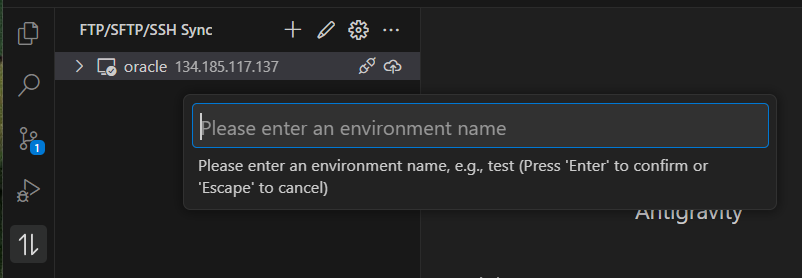
FTP/SFTP/SSH Sync 툴에서 + 를 클릭
여기서 해당 remote를 대표하는 이름을 적어 넣습니다.
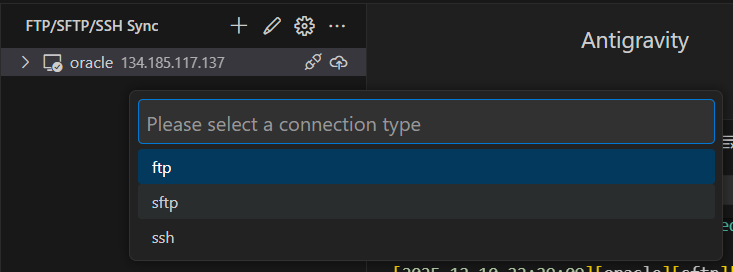
SFTP 선택 (따로 FTP 21을 오픈할 필요없이 22번 SSH로 접속 가능)
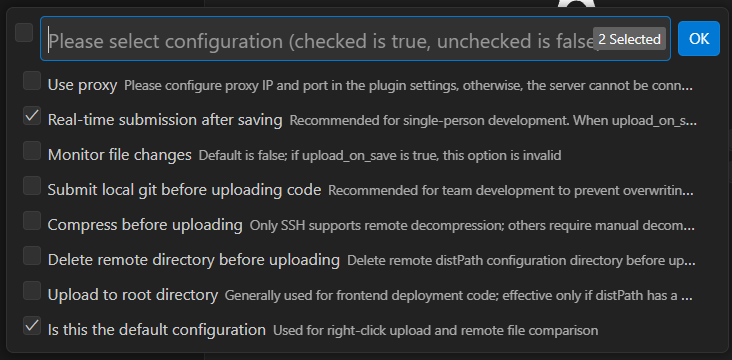
다음을 선택
- Real-time submission after saving
- is this the default configuration
다른거 선택하면 안됨!!
이후에 sync_config.jsonc 가 나오고 여기서 실제 설정.
다음을 반드시 설정
- host
- port
- privateKeyPath
- remotePath
{
  "oracle_server": {
    "type": "sftp",
    "host": "134.185.117.137",
    "port": 22,
    "username": "ubuntu",
    "privateKeyPath": "C:/Users/anderson/.ssh/id_ed25519",
    "proxy": false,
    "upload_on_save": true,
    "watch": false,
    "submit_git_before_upload": false,
    "submit_git_msg": "",
    "build": "",
    "compress": false,
    "remote_unpacked": false,
    "delete_remote_compress": false,
    "delete_local_compress": false,
    "deleteRemote": false,
    "upload_to_root": false,
    "distPath": [],
    "remotePath": "/home/ubuntu/projects",
    "excludePath": [],
    "downloadPath": "",
    "downloadExcludePath": [],
    "default": true
  }
}